Google Sheets add-on

IBAN validation and bank lookup in Google Sheets

Select a column of IBANs and IBANAPI checks every one of them, then adds the bank name, BIC and country next to it. Built for finance teams checking supplier, payroll and customer bank details.

10,000 IBANs per run
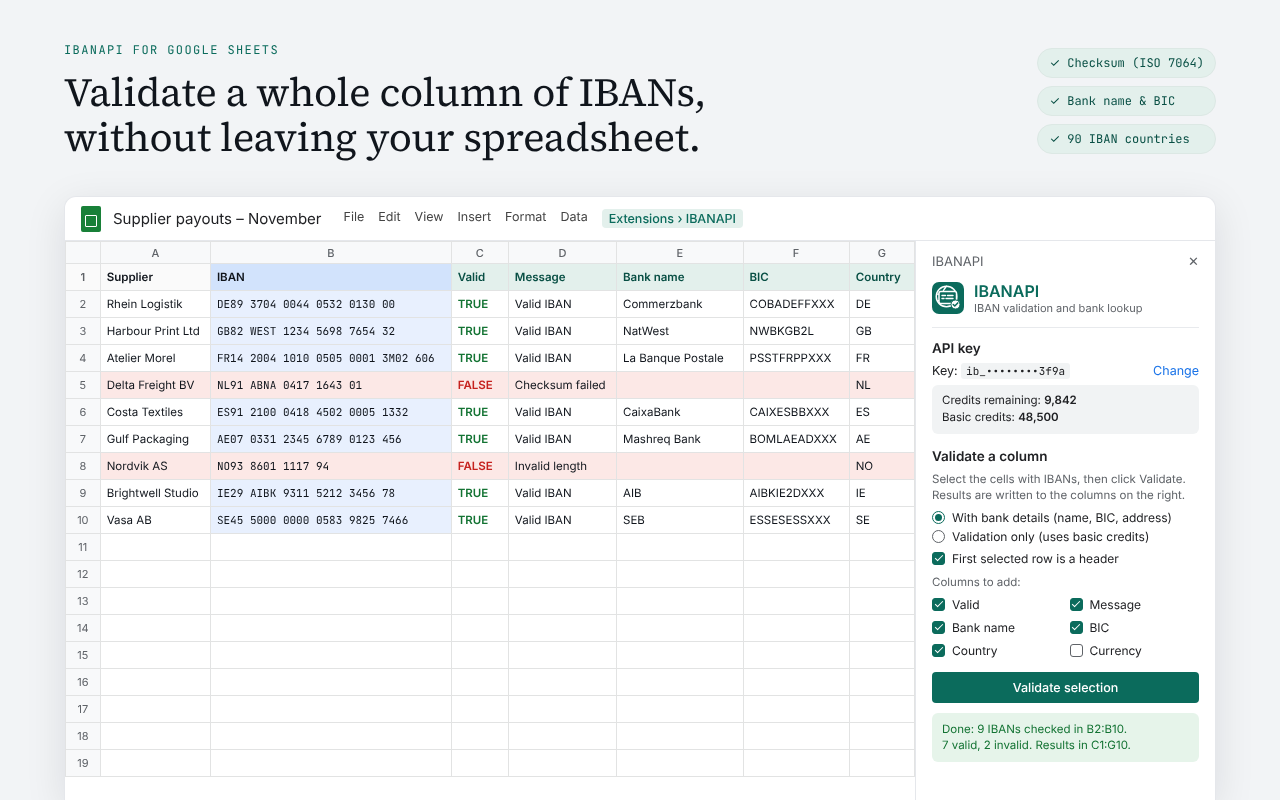
A Google Sheet of supplier IBANs validated by the IBANAPI add-on, with Valid, Message, Bank name, BIC and Country columns filled in and the IBANAPI sidebar open on the right
What it does

Two ways to check IBANs in Sheets

Validate a column in one click, or use formulas that keep results up to date as your data changes. Both use the same IBANAPI engine as our API.

Sidebar

Validate a whole column

Select the IBANs and click Validate. Results go into the columns on the right: valid or not, the reason, bank name, BIC, country, currency, SEPA membership and bank address. You choose the columns, and the add-on asks before overwriting any cell.

Formulas

Use it like any other function

=IBAN_VALID, =IBAN_BANK, =IBAN_BIC and =IBAN_LOOKUP work on one cell or a whole range. Pass a range to check hundreds of IBANs in a single bulk request.

Your account

Your key, your credits

The add-on uses your own IBANAPI API key, stored in your Google account and never in the spreadsheet. Pick validation only to use basic credits, or include bank details when you need them.

Formulas

Four functions, one cell or a whole range

Spaces, dashes and lowercase letters are cleaned up for you, and empty cells stay empty.

=IBAN_VALID(B2:B500) // TRUE or FALSE, uses basic credits only =IBAN_BANK(B2:B500) // bank name =IBAN_BIC(B2:B500) // BIC / SWIFT code =IBAN_LOOKUP(B2:B500, "city") // one field: valid, message, bank_name, bic, // country_name, country_code, currency_code, // sepa_member, address, city, zip, bank_account
Install

Up and running in a couple of minutes

You need a Google account and an IBANAPI API key. If you don't have a key yet, sign up for free and copy it from your dashboard.

01

Install the add-on

In Google Sheets, open Extensions > Add-ons > Get add-ons, search for IBANAPI and click Install. Google asks you to allow the add-on to work with your spreadsheet and to connect to IBANAPI.

02

Add your API key

Open Extensions > IBANAPI > Open IBANAPI, paste your API key and click Save. The add-on checks the key and shows your remaining credits.

03

Validate your IBANs

Select the cells with IBANs, tick the columns you want and click Validate selection. Or type a formula such as =IBAN_BANK(B2:B100) in any cell.

Your organisation uses Google Workspace? An admin can install the add-on for everyone from the Google Admin console, under Apps > Google Workspace Marketplace apps.

Using Microsoft Excel instead? Try the IBANAPI Excel add-in.

FAQ

Common questions about the Google Sheets add-on

Is the add-on free?

The add-on itself is free to install. Each IBAN it checks uses credits from your IBANAPI account, exactly like an API call, so you can start with a free API key and move to a paid plan when you need more.

How many credits does a check use?

With bank details, each IBAN uses 1 basic credit, plus 1 bank lookup credit when the bank is found. Validation only uses 1 basic credit. Each distinct IBAN is checked once per run, and results are cached in your account for 6 hours, so recalculating a formula doesn't use your credits again.

What data does the add-on access?

Only the cells you select, or the cells you pass to an IBANAPI formula. Those IBANs are sent to our API to be validated and the results are written back to your sheet. It doesn't read the rest of the spreadsheet or any other file. The details are in the Google Sheets section of our privacy policy.

Can other people who edit my spreadsheet see my API key?

No. The key is saved in your own Google account, not in the spreadsheet. A colleague who uses the add-on on the same sheet adds their own key, and their checks use their own credits.

How many IBANs can I validate at once?

Up to 10,000 IBANs per run when you validate a selection. Formulas accept whole ranges too, for example =IBAN_BANK(A2:A500), which is much faster than filling a formula down row by row because the range is checked in bulk.

Does a valid IBAN mean the account exists?

No. A valid result means the IBAN is well-formed: right length, correct check digits, correct structure and, for many countries, a valid national account checksum. Only the bank can confirm the account is open and who holds it.